Messages in. Actions out.
The moment everything changed
OpenClaw changed how people think about AI. Not a chatbot. Not a search box. Something that actually does things on your behalf, across the tools you already use.
That landed differently than most AI demos. People got it immediately. And then they started asking: what does this look like for work?
That question is what we’ve been building toward.
Your messages are full of work you haven’t done yet
Every message you get is the start of something. A Slack from a colleague is a task you haven’t created yet. An email from a customer is a follow-up you haven’t scheduled. A thread in Teams is a decision you haven’t made.
The problem isn’t the messages. It’s the gap between receiving them and doing something about them. That gap is where work falls through.
The insight we keep coming back to: if AI can read your messages, it can close that gap. Not just organize your inbox — actually handle the work. Messages come in. Actions go out. That’s the whole idea.
We’ve built this+that around that loop: messages feed tasks, tasks feed workflows, workflows feed autonomous actions. Today we’re shipping the pieces that complete it.
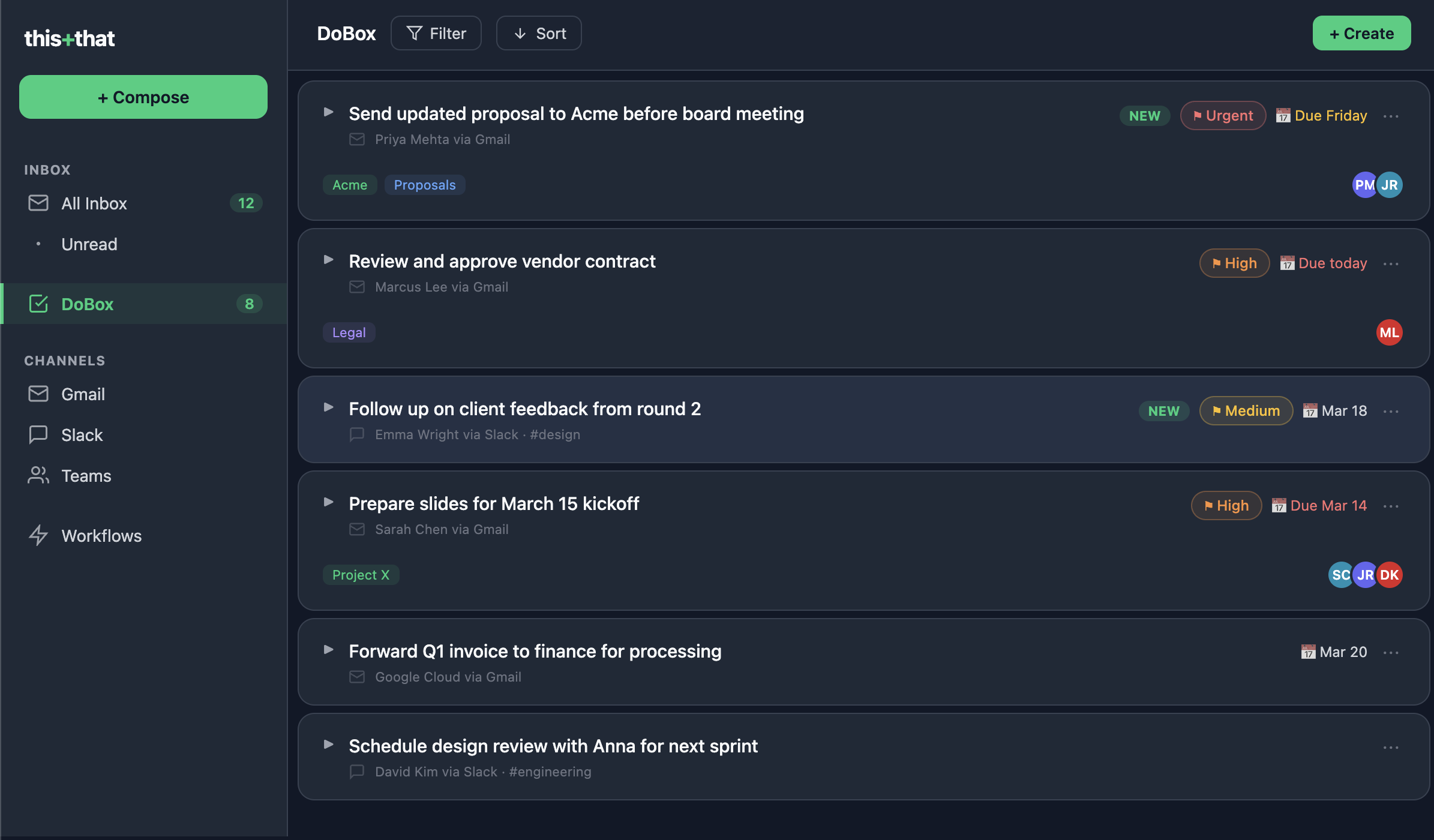
The DoBox is now a full task manager
We’ve always extracted tasks from your messages. Now we’ve built the task manager to go with them.
The DoBox reads your conversations across Gmail, Outlook, Slack, and Teams and pulls out everything you actually need to do — across all of it, in one place. Not a summary. Not a digest. Real tasks, connected to the message they came from, so you always know where something originated and can jump back to context in one click.
You can also add tasks yourself, set due dates, prioritize, and organize however you want. The DoBox works as a standalone task manager too — it just happens to have an AI feeding it automatically from every conversation you’re in.
No more scanning threads to figure out what you owe someone. No more dropping the ball because something got buried. Everything you need to do is in one place, and it got there without you having to lift a finger.
The Workflow Designer connects everything
Task extraction was the beginning. Automation is where this gets powerful.
The Workflow Designer lets you build flows visually — drag blocks, connect triggers and actions, wire up whatever sequence you want. Or skip the builder entirely: describe what you want in plain language and let the AI create the workflow for you.
A few examples of what this looks like in practice:
A colleague Slacks you the latest customer research and asks you to work the findings into a PRD. Your workflow picks up the message, locates the doc, and starts drafting — without you ever touching it.
A VIP emails you. Your workflow extracts action items from the thread, drafts a reply based on your history with them, and schedules a follow-up on your calendar.
A project label gets applied to every relevant incoming thread. Low-priority newsletters get archived before they can clutter your view. A daily digest of what actually matters hits your inbox at 8am.
These aren’t hypotheticals. They’re live workflows our beta users are running right now.
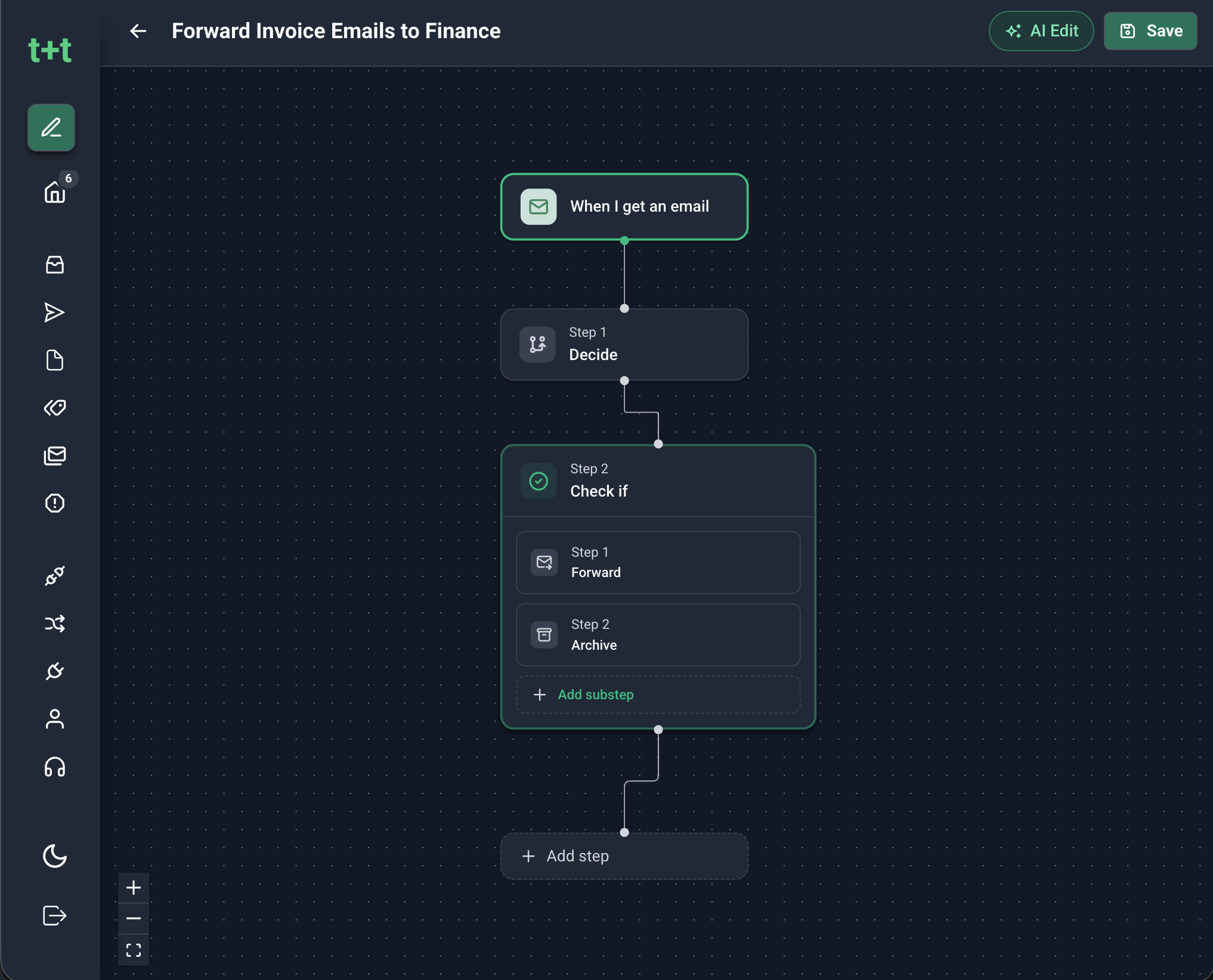
The Workflow Designer also supports MCP servers, which means you can connect to virtually any tool with an MCP interface — not just the ones we’ve built native integrations for. If a tool you rely on has an MCP server, you can wire it into a workflow.
What we built — and why
Every existing email client added AI as a feature. A button that summarizes threads. A sidebar that drafts replies. Useful, but it still leaves you in the loop for everything.
We started from a different assumption: the AI should be the collaborator, not the add-on. That means the interface is built around what the AI can do, not retrofitted to support it.
The result is a product where the AI reads everything coming in and takes care of as much as you want it to. You decide how much autonomy to give it. You stay in the loop on what matters. But the default state is that things are getting done — not just tracked.
Your inbox is full of work. this+that does it.
Sign up free and see what your inbox looks like when the work actually gets done.