Why Is My Inbox Always Full of Hidden Tasks I Keep Missing

The tasks you keep missing aren’t really missing. They’re buried inside messages you’ve already read. Knowledge workers lose hours every day to “work about work”: pulling tasks out of emails by hand, hunting through Slack threads, copying action items from one app to the next.
this+that takes that drain away. It reads the messages across your communication tools, extracts the tasks, and runs them across your connected platforms, all without you stepping in. The whole thing is built around AI task capture and execution, so conversations turn into finished work without the manual overhead.
Key Takeaways
- 60% of work time goes to coordination instead of skilled, strategic work
- Pulling tasks out by hand is a “manual tax” that costs teams hours per person every day
- AI-powered inbox automation takes a lot of the manual effort out of interpreting, organizing, and acting on incoming work
- Task extraction matters, but the bigger opportunity is workflow execution across email, chat, meetings, and connected tools
- Bouncing between apps badly disrupts focus and raises the cost of following through by hand
- Free beta programs are an accessible way into advanced inbox automation and workflow systems with nothing upfront
What Is the ‘Manual Tax’ and Why Does Task Management Feel Like a Chore?
Tasks don’t slip through the cracks because you’re disorganized. They slip because extracting them by hand has a hidden cost. That’s the “manual tax”: the time you spend moving information between systems yourself. Every copy-paste, every re-typed action item, every to-do you create by hand adds friction, and it piles up over the course of a day.
- Repetitive extraction work: Reading through emails to work out what actually needs doing takes real cognitive effort.
- Context switching penalties: Bouncing between communication tools and task managers badly disrupts focus, and you lose a lot of time refocusing after each interruption.
- Information loss: Tasks that come up out loud in meetings, or get buried in a thread reply, often get missed completely.
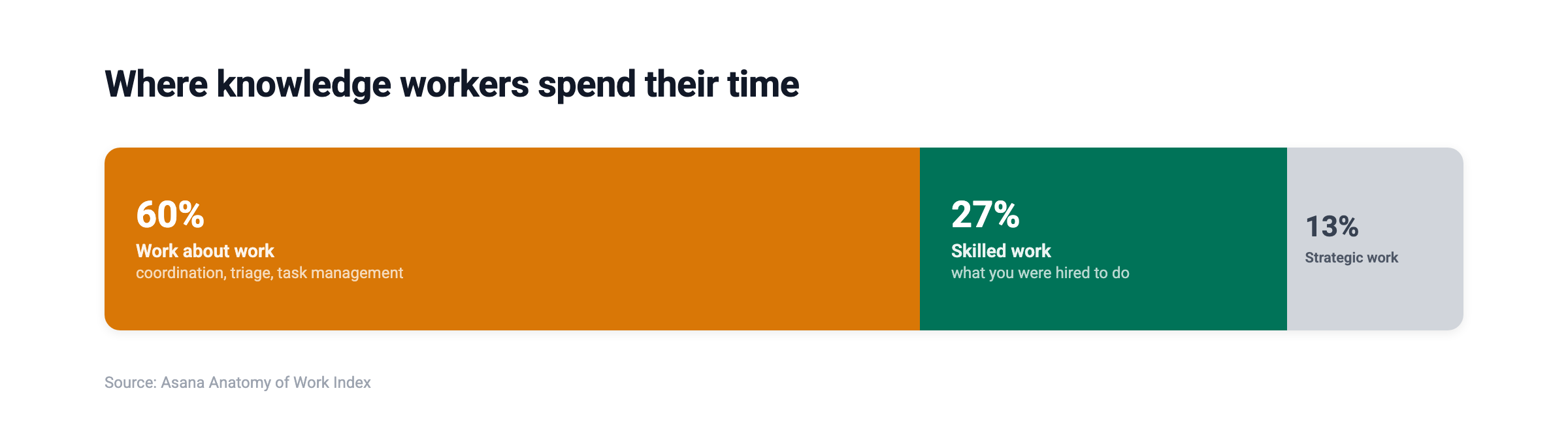
- Productivity drain: “Work about work” eats 60% of knowledge workers’ time (Asana Anatomy of Work Index), which leaves very little room for strategic priorities.
- Reactive work cycles: Without automated capture, people default to whatever looks most urgent instead of what’s most important.
this+that cuts that manual tax down. It recognizes the work in your messages automatically and helps with the next steps, so you’re not reconstructing everything by hand. Try this+that free to see how much inbox-driven work is sitting buried across your messages right now.
How Much Time Does Manual Task Management Actually Cost?
The Asana Anatomy of Work Index found that workers spend only 27% of their time on the skilled work they were actually hired to do. The rest disappears into meetings, communication, and coordination. That’s the manual tax in action.
this+that goes straight at that burden by automating task capture and execution from across your communication tools, which can give you back hours of productive time a day.
Why Do Traditional Inbox Management Methods Fail?
If the manual tax is the root cause, the obvious question is why existing productivity systems haven’t fixed it. Mostly because they were designed for a communication landscape that doesn’t exist anymore.
- Multiple inbox explosion: Knowledge workers now juggle Gmail, Outlook, Slack, Microsoft Teams, WhatsApp, meeting notes, and project management tools all at once. Methodologies like David Allen’s Getting Things Done assumed a single inbox, not the scattered reality of modern work.
- Information silos: Each platform spins up its own isolated task stream, something older frameworks never expected to manage.
- Cross-channel conversations: One project might run across email threads, Slack channels, Zoom calls, and shared documents, with buried action items in each.
- Asynchronous work patterns: Remote and hybrid work means tasks show up around the clock, not just during set work hours.
- Message volume growth: The average professional gets around 121 emails daily on top of hundreds of chat messages.
What Do Traditional Methods Still Get Right?
The core principle, capturing everything into a trusted system, still holds. It’s the execution method that needs an update. Single-inbox processing works fine when you have one inbox, but it falls apart the moment work is spread across five or six channels.
Modern workflow automation applies that same “capture everything” principle across every channel at once, and it also helps route, organize, and follow through without leaning on constant manual discipline from you.
How Can You Organize Email in Outlook and Gmail to Stop Missing Tasks?
Before reaching for automation, a lot of people try to fix this by hand, reorganizing their email clients. Email is still where most hidden tasks live, so getting organized inside your email client is the foundation for capturing work well.
- Create action-required folders: Use dedicated labels or folders to separate emails that contain tasks from purely informational ones.
- Use filters for sender prioritization: Automatically route emails from key stakeholders, clients, or projects into high-priority views.
- Apply consistent labeling systems: Keep labels like “Waiting On,” “This Week,” and “Reference” the same across both Outlook and Gmail.
- Schedule processing windows: Batch your email review into 2-3 dedicated sessions instead of checking constantly.
- Enable keyboard shortcuts: Gmail and Outlook both offer shortcuts that enable keyboard shortcuts to speed up inbox processing.
- Archive aggressively: Keep your inbox lean by archiving completed items right away.
What Gmail-Specific Strategies Work Best?
Gmail’s native features support task extraction when used intentionally:
- Stars and importance markers create quick visual prioritization
- Multiple inbox view displays categories side-by-side
- Snooze functionality resurfaces emails at relevant times
- Google Tasks integration converts emails to tasks with one click
For teams that want more than Gmail’s native features, DoBox for Gmail adds an inbox-native interface for reviewing and organizing the work it recognizes in email. Inside the wider this+that platform, it’s one way to handle inbox-driven follow-through without ever leaving Gmail.
What Outlook-Specific Strategies Improve Task Visibility?
Outlook offers distinct organizational capabilities:
- Focused Inbox separates important messages from noise automatically
- Quick Steps automate multi-action sequences on incoming mail
- Categories enable visual color-coding across messages and the calendar
- Flags convert messages to tasks with due date assignments
Which Time Management Skills Help Knowledge Workers Catch Hidden Tasks?
Organizing your inbox isn’t enough on its own. What really decides whether your system works is the habits you build around processing messages. Technology can’t solve task visibility by itself, so good habits are what let you work effectively in any setup.
- Weekly review discipline: Set aside 30-60 minutes a week to go through every inbox and task list for anything you missed.
- Two-minute rule application: If a task takes under two minutes, just do it instead of tracking it.
- Priority matrix usage: Sort tasks by urgency and importance so you can put your energy into high-impact work.
- Time blocking practice: Give specific calendar blocks to types of tasks instead of switching around reactively.
- Distraction management: Turn off notifications during focus periods so you’re not getting interrupted with new tasks constantly.
- Goal-aligned filtering: Weigh incoming requests against your defined objectives before you accept them as tasks.
How Do You Build Sustainable Productivity Habits?
Habits are built on consistency, not intensity. Start with one change, maybe a daily 15-minute inbox processing session, and stick with it for 30 days before you add anything else. Automation tools like this+that take some of that discipline off your plate by handling routine capture for you.
What Makes Automated Task Management Tools More Effective Than Manual Methods?
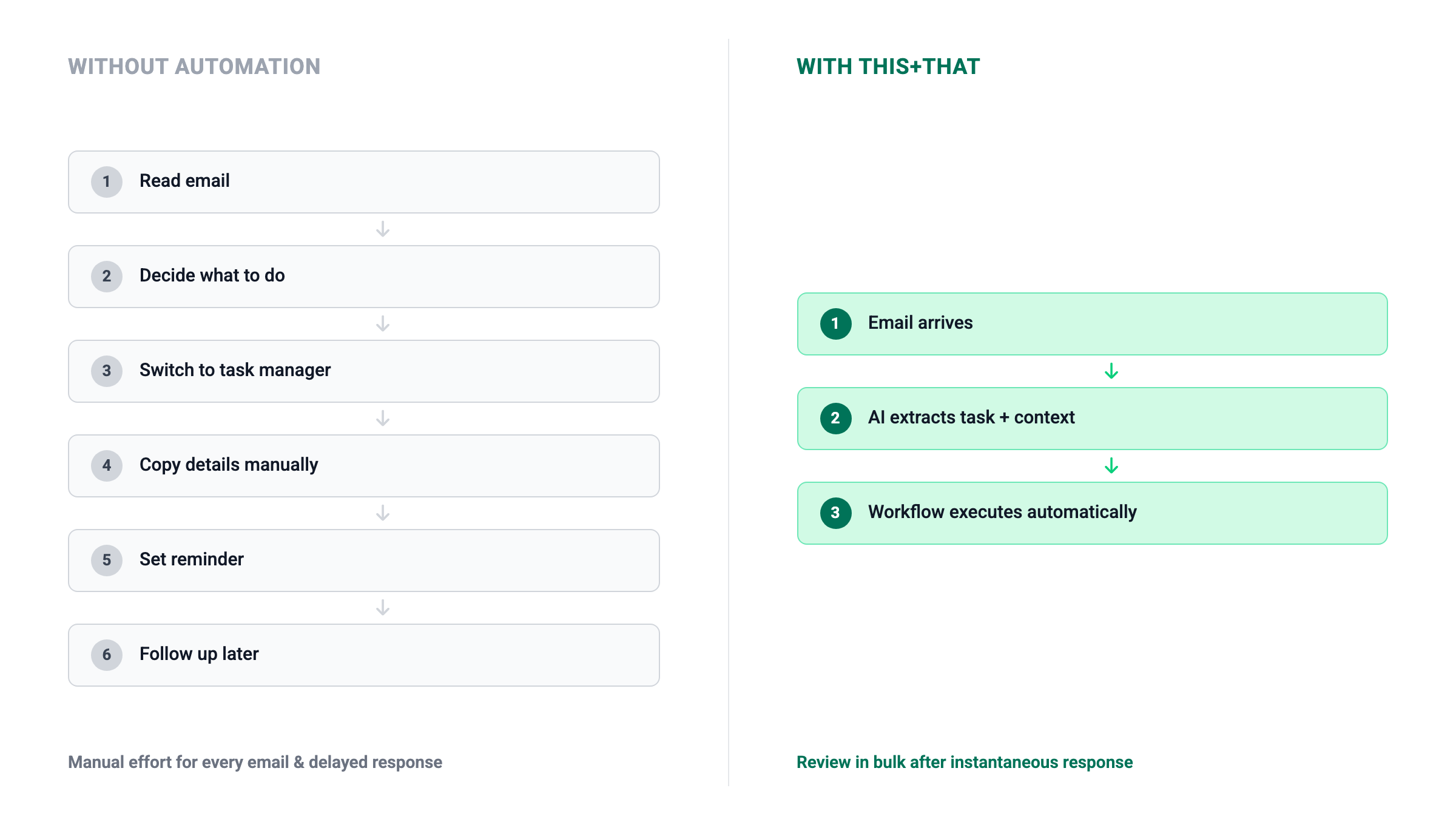
Even with solid habits and a well-organized inbox, manual approaches hit a ceiling as message volume climbs. The gap between manual and automated task management gets wider as the workload grows, because automation keeps capturing consistently no matter how big the spike or how tired you are.
- Immediate recognition of incoming work: AI can spot requests and next steps the moment messages arrive, instead of waiting for you to review them.
- Consistency across channels: Automated systems apply the same logic to emails, chats, and meeting transcripts, so fewer things fall through the gaps between fragmented tools.
- Reduced decision fatigue: Skipping the repeated “what does this need from me?” question saves mental energy for higher-value work.
- Proactive follow-through: Smart systems can surface priorities, deadlines, and next actions without you having to watch for them.
- Integration depth: Work can flow straight into project tools, calendars, CRMs, and operational workflows on its own.
How Does DoBox Create a Self-Filling Task Manager?
DoBox works as a task manager that fills itself from your conversations. Instead of asking you to type things in, DoBox pulls commitments, deadlines, and action items out of incoming messages and organizes them by priority and due date.
That flips the usual task management model on its head. Rather than adding tasks to a list, you look over what the system has already captured and confirm or tweak it as needed.
If you want a task manager that fills itself from your messages instead of requiring constant manual entry, try this+that free and let DoBox capture your tasks for you.
How Does AI-Driven Task Management Software Go Beyond the Inbox?
Capturing tasks is just the first step. The real productivity gains show up when AI moves past passive extraction and into actually doing the work. Modern systems read context, predict priorities, and act on their own.
- Natural language processing: AI reads conversational requests like “follow up with Sarah next Tuesday” without needing rigid syntax.
- Contextual understanding: Systems can tell that “let’s circle back” in a sales email means something different from casual chat.
- Predictive analytics: Patterns from your history feed into task prioritization and deadline suggestions.
- Intelligent automation: Past capture, AI can draft responses, route tasks to the right team members, and update outside systems.
- Cross-platform synchronization: A task spotted in any connected channel shows up in your unified views right away.
What Can AI Workflows Actually Do?
this+that Workflows build automated sequences from natural language prompts. You describe what you want in plain English, like “classify incoming support emails by urgency and draft initial responses”, and the system runs it.
AI steps inside workflows can:
- Classify message senders by relationship type
- Extract specific data points from unstructured text
- Draft contextually appropriate replies
- Route tasks to team members based on content
- Update CRM records or project management tools
These workflows run on your messages as they come in, so the work happens in the background and you never have to kick it off. Try this+that free to see how many of these could be running on your messages today.
Why Does Your Task Management App Need to Connect Everywhere?
AI-driven automation is only as useful as the tools it can actually reach. An isolated task manager just recreates the fragmentation it’s supposed to fix, and real task visibility means integrating across your whole tool ecosystem.
- API integrations: Direct connections to Gmail, Outlook, Slack, Microsoft Teams, and project tools let data flow automatically.
- Open architecture benefits: Platforms that support open standards bend to fit your existing stack instead of forcing you to switch tools.
- Universal connectors: MCP (Model Context Protocol) and similar standards let you connect to any MCP-compatible tool, internal systems included.
- Ecosystem compatibility: Check whether integrations exist for HubSpot, Jira, Notion, GitHub, Salesforce, and the other tools you use every day.
- Centralized visibility: One interface that shows tasks from every source means you’re not checking a handful of apps.
this+that is built on exactly this kind of open architecture, using MCP to connect with the tools your team already relies on rather than pushing you onto a new stack.
Can Free Task Management Apps Give You Access Without Upfront Costs?
Cost keeps a lot of professionals and small teams from getting to advanced task management. Free options, beta programs included, are a legitimate way to try automation before you spend anything.
- Basic feature accessibility: Free tiers usually cover core task capture, list management, and basic reminders.
- Open-source alternatives: Platforms like n8n give you self-hosted automation with no licensing costs.
- Beta program advantages: Early-access programs hand you the full feature set for free in exchange for your feedback.
- Trial period value: Longer trials give you room to evaluate properly before you commit any money.
- Team onboarding ease: Free access makes it much easier to get skeptical colleagues onto a new tool.
What Does this+that’s Beta Program Offer?
this+that is free during beta right now, no credit card required. That gives you a no-cost way into advanced task management, including:
- Automated task extraction from email and chat
- AI-powered workflow creation
- Multi-channel integration
- DoBox self-filling task management
The beta is a chance to get enterprise-grade automation without an enterprise budget.
What Does the Future of Workflow Automation Look Like?
Task management is shifting from capture-and-track systems toward intelligent agents that do the work themselves. The direction of travel is human-AI collaboration, where AI handles the routine execution and humans set the strategic direction.
- Predictive tasking: Systems will see tasks coming before you ask, scheduling follow-ups, prepping documents, and queuing up communications ahead of time.
- Adaptive workflows: Automation will learn from your corrections and preferences and get more accurate over time, without you rewriting rules by hand.
- Intelligent agent delegation: Complex, multi-step processes will run end-to-end with only the occasional human checkpoint.
- Process optimization insights: AI will flag bottlenecks, redundancies, and places to improve across your workflows.
- Smooth human-AI handoffs: Clear escalation paths will send edge cases to humans while the routine work keeps running on its own.
How Do this+that Workflows Enable This Future Today?
this+that Workflows give you visual automation that’s triggered by incoming messages. You build sequences that run actions like:
- Drafting contextual email replies
- Routing tasks to the right team members
- Updating CRM records with extracted information
- Creating calendar events from scheduling requests
- Filing documents in the right project folders
This is the messages-in, actions-out model, turning passive inboxes into active execution engines.
If your inbox is full of tasks you keep missing, the problem isn’t organization. It’s manual extraction. Try this+that free and start turning conversations into completed work automatically.
Frequently Asked Questions
How does AI actually understand what qualifies as a ‘task’ in my messages?
AI task extraction uses natural language processing to pick out requests, commitments, deadlines, and follow-ups in business conversations. It spots the patterns in how people hand off work and pairs that with contextual signals like who sent the message and what came earlier in the thread. Edge cases may still need a human to confirm them.
Is it secure to connect all my communication channels to one platform?
It depends on the platform. Before you connect work accounts, look over the provider’s privacy, security, and data-handling practices and make sure they meet your organization’s requirements.
What’s the difference between a traditional task manager and an automated one?
Traditional task managers run on manual input: you create the tasks, set the deadlines, and keep the list up to date yourself. Inbox automation can recognize work in the communications you already have, hold onto the relevant context, and help with follow-up actions on its own. The difference comes down to tracking work by hand versus having a system that helps organize it and move it forward for you.
Can automated workflow systems replace the need for human oversight?
Today’s systems add to human judgment rather than replace it. Automation handles the routine, predictable tasks accurately and surfaces the exceptions for a person to decide on. The point is to cut the time you spend on mechanical work (copying, routing, scheduling) so people can focus on judgment calls, relationships, and the creative problem-solving AI can’t replicate.
How do I balance automation with my personal organizational preferences?
Good platforms let you customize extraction rules, prioritization, and workflow triggers. Most people start on the default settings and then adjust them to match how they like to work. Automation usually takes care of most of the routine tasks, and you keep control over the edge cases.