7 Best Fyxer Alternatives for AI Task Management and Workflow Automation

While Fyxer AI has gained traction with over 100,000 users for email management and meeting notes, modern knowledge workers need solutions that capture tasks across every communication channel, not just email. From unified inbox automation to AI-powered scheduling, these seven alternatives address specific workflow challenges that extend beyond single-channel tools. This comprehensive analysis examines each platform’s strengths and ideal use cases to help teams, operators, and founders find the right fit for their AI task capture and execution needs.
Key Takeaways
- The best AI workflow tools reduce friction by capturing work where conversations already happen. Strong solutions help teams turn messages, meetings, and requests into actionable tasks without relying on manual entry or constant app-switching.
- The right platform depends on whether your priority is task capture, workflow automation, or calendar execution. Some tools are strongest at surfacing action items from communication channels, while others are better suited for scheduling, project planning, or time management.
- Cross-channel visibility is becoming a defining advantage in modern productivity software. As work spreads across inboxes, chat apps, meetings, and docs, tools that unify these inputs can give teams a clearer view of responsibilities and follow-through.
- this+that stands out by focusing on conversation-to-action workflows across multiple channels. Its approach emphasizes pulling tasks from everyday communication and connecting them to downstream automations, helping teams move from scattered discussions to organized execution.
The productivity tool landscape has evolved rapidly as teams recognize that work starts with messages, not task managers. Industry research indicates that tool-switching hampers productivity for knowledge workers, who spend significant portions of their workweek navigating multiple applications. This reality drives the search for alternatives that consolidate communication channels into unified workspaces.
| Tool | Multi-channel | Task extraction | Workflow automation | MCP support | Free tier |
|---|---|---|---|---|---|
| this+that | ✓ | ✓ | ✓ | ✓ | Free during beta |
| Motion | — | — | ✓ (calendar) | Via Zapier | From $19/mo |
| Reclaim AI | — | — | Calendar only | Via Zapier | Free tier available |
| ClickUp | — | AI add-on | ✓ | 1000+ native | Free tier available |
| Notion AI | — | AI add-on | Basic | 100+ native | Free tier available |
| Taskade | — | ✓ (agents) | ✓ | 100+ | Free tier available |
| Superhuman | Email only | AI triage | — | Limited | From $25/mo |
1. this+that: The Multi-Channel Conversation-to-Action Platform
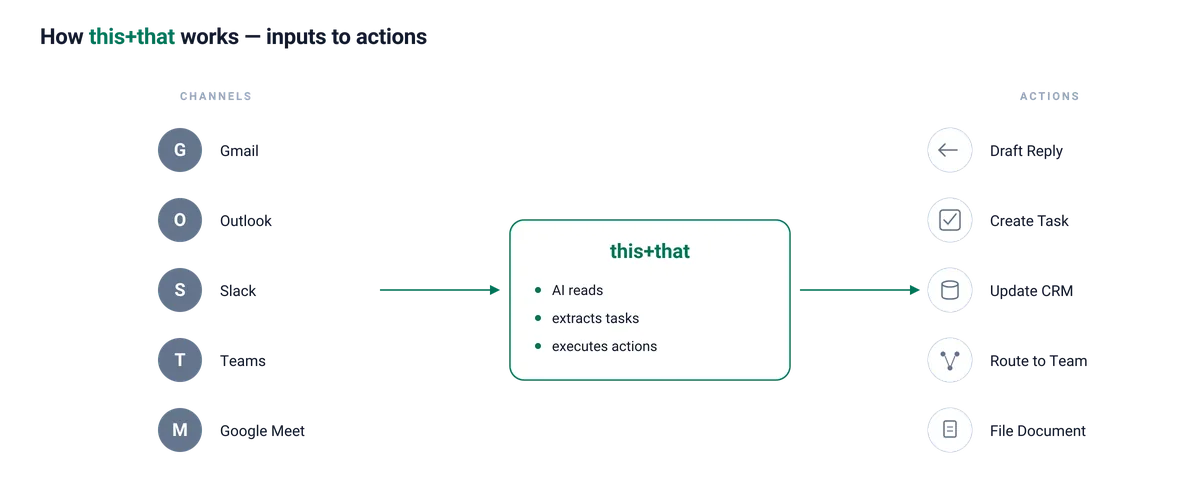
this+that is an inbox-first AI workflow platform designed to turn incoming work into action across connected tools. It analyzes requests that arrive through email, chat, and meeting summaries, identifies what needs to happen next, and helps execute those workflows automatically, with user oversight when needed.
Key Features
- Inbox-first multi-channel integration connects Gmail, Outlook, Slack, Microsoft Teams, WhatsApp, Google Meet, and Google Docs: This gives teams a single operating layer for work that arrives through communication channels, rather than forcing them to reconstruct context across separate apps.
- AI-powered workflow automation turns incoming requests into next steps across connected tools: Teams can build workflows using natural language prompts or a drag-and-drop interface, combining triggers, AI reasoning steps, and downstream actions without code.
- AI task capture identifies requests, deadlines, follow-ups, commitments, decisions, and approvals across channels: Instead of relying on manual entry, the system recognizes work embedded in conversations and brings it into an actionable workflow.
- Source conversation linking preserves the original thread, participants, and timestamps: Every task or workflow step stays tied to the conversation that generated it, making it easier to verify intent and maintain context.
- DoBox provides an AI-fed workspace for organizing and managing extracted work: Teams can review, assign, prioritize, and track action items in one place, but it functions as part of the broader workflow system rather than the sole destination for captured tasks.
- The DoBox for Gmail extension provides direct inbox integration, allowing users to capture tasks without leaving their email client. This conversation-to-action approach addresses the root cause of missed tasks: commitments made in messages that never get written down.
- MCP server support enables connection to any API through Model Context Protocol: This extensibility allows integration with GitHub, Notion, HubSpot, Jira, Dropbox, Salesforce, and custom internal tools, expanding beyond pre-built integrations to accommodate any workflow requirement.
- Free during beta
Best For
this+that serves engineering leads managing sprint action items, sales leads routing inbound requests, and operations heads coordinating customer onboarding, meeting follow-ups, and approval workflows. It is especially relevant where the challenge is not just tracking tasks, but turning incoming messages into reliable workflow follow-through.
If your team is managing work across multiple tools, try this+that free or analyze your inbox to see how much work can be automated.

2. Motion
Motion positions itself as an intelligent project manager that automatically schedules tasks on your calendar, balancing workload across team members and adapting when priorities shift.
Key Features
- AI auto-scheduling dynamically places tasks on your calendar and reschedules when conflicts arise: The system continuously optimizes your schedule by automatically moving tasks based on priorities, deadlines, and new commitments, eliminating manual calendar Tetris when plans change.
- Project management includes Gantt charts, Kanban boards, and capacity planning views: Multiple visualization options allow teams to track work progress through timeline views, card-based workflows, or resource allocation dashboards, depending on project management methodology preferences.
- Team workload balancing distributes tasks across team members based on availability: Automatic assignment considers each person’s calendar, existing commitments, and capacity to prevent overload and ensure even distribution of work across the team.
- Meeting scheduling provides built-in booking links and calendar management: Integrated scheduling eliminates external tools by offering shareable availability links, meeting booking workflows, and automatic calendar blocking for confirmed appointments.
- Integration ecosystem connects with thousands of apps via Zapier: Extensibility through Zapier’s integration platform enables connection to virtually any business tool, allowing Motion to trigger actions or receive data from CRMs, project management systems, communication tools, and custom applications.
Best For
Motion is used by individuals and teams that manage tasks directly within their calendars and require automated scheduling and time blocking. It is typically applied in workflows where task prioritization, time allocation, and schedule adjustments are handled within a single calendar-driven system.
3. Reclaim AI
Reclaim AI, acquired by Dropbox in 2024, specializes in protecting your calendar time through intelligent scheduling, habit defense, and focus time management.
Key Features
- Smart time blocking automatically schedules tasks around existing commitments: The system finds optimal time slots for your work tasks by analyzing calendar availability, automatically placing and adjusting task blocks as your schedule changes throughout the week.
- Habit defense protects recurring routines like exercise, lunch, and deep work: Designated personal habits get automatically scheduled and defended from meeting requests, ensuring consistent time for activities that support productivity and wellbeing.
- Focus time protection blocks uninterrupted work periods on your calendar: Automatic scheduling of concentrated work sessions creates buffer zones free from meetings, with the system declining or suggesting alternative times for conflicting meeting requests.
- Meeting optimization includes smart scheduling links with buffer time: Intelligent booking pages consider travel time, preparation needs, and rest periods between meetings, preventing back-to-back scheduling that leads to burnout and rushed transitions.
- Analytics dashboard tracks time allocation across categories: Detailed reporting shows how your time is distributed across meetings, focus work, personal habits, and breaks, providing visibility into whether your actual time usage aligns with priorities.
Best For
Reclaim AI includes features designed to optimize calendar usage, such as focus time scheduling and automated time blocking. It is used in workflows centered on calendar management rather than task extraction from conversations.
4. ClickUp
ClickUp is an all-in-one project management platform with AI capabilities available through its Brain add-on feature. The platform is used across a range of teams for task management, collaboration, and workflow organization.
Key Features
- Complete project management encompasses tasks, docs, goals, time tracking, and dashboards: Integrated suite consolidates project planning, execution, documentation, objective tracking, and performance reporting in one platform, eliminating the need for separate tools for each project management function.
- ClickUp Brain AI provides summarization, writing assistance, and automation suggestions: Optional AI add-on analyzes your work patterns to generate content summaries, draft project updates, suggest process improvements, and identify automation opportunities across your workflows.
- 1,000+ native integrations connect with Salesforce, HubSpot, Slack, and major business tools: Extensive integration library enables bidirectional data sync with CRM systems, communication platforms, file storage, and specialized business applications without relying on third-party integration services.
- Customizable workflows offer flexible views, including List, Board, Gantt, and Calendar: Multiple visualization options allow teams to structure work according to their preferred methodology, switching between linear lists, kanban boards, timeline charts, and calendar views for the same underlying data.
- Enterprise compliance includes SSO, admin controls, and security certifications: Advanced security features provide single sign-on integration, granular permission management, audit logging, and compliance with standards like SOC 2, ensuring the platform meets enterprise security requirements.
Best For
ClickUp is used by teams that require project management infrastructure with optional AI features. The platform includes automation capabilities within its AI functionality, and setup may involve initial configuration of workflows. It is typically implemented as a centralized system for managing tasks, projects, and team collaboration.
5. Notion AI
Notion is a workspace platform used for documentation, databases, and team collaboration, with AI features that support writing and summarization within its interface.
Key Features
- Flexible workspace combines documents, databases, wikis, and project tracking: Unified platform allows teams to create interconnected pages, structured databases, knowledge repositories, and task lists within a single environment, adapting to various organizational needs without separate tools.
- AI writing assistance provides drafting, editing, summarizing, and translating content: Integrated AI helps generate initial drafts, refine existing text, condense long documents into key points, and convert content across languages directly within workspace pages.
- Database automation uses formulas, relations, and rollups for connected information: Advanced data modeling capabilities link related information across databases, calculate derived values, and aggregate data from connected records, creating dynamic systems that update automatically.
- Team collaboration enables real-time editing, comments, and sharing controls: Multiple users can simultaneously edit pages, leave threaded comments for discussion, and manage granular permissions determining who can view, comment, or edit specific content.
- Template ecosystem offers thousands of pre-built templates for common workflows: Extensive template library provides starting points for project management, meeting notes, design systems, product roadmaps, and other business processes, reducing setup time for common use cases.
Best For
Notion is used in workflows that combine documentation, knowledge management, and task tracking within a page-based system. Its structure is centered around internal content organization rather than extracting tasks from external communication channels.
6. Taskade
Taskade offers an AI-native workspace combining task management, document collaboration, and autonomous AI agents for workflow automation.
Key Features
- AI agents function as autonomous assistants that execute multi-step workflows: Programmable agents can automatically complete sequences of tasks, respond to triggers, process information, and take actions across your workspace without manual intervention for each step.
- Unified workspace integrates tasks, notes, mind maps, and video chat: Single platform combines project management, documentation, visual brainstorming, and real-time communication, eliminating context switching between separate tools for different types of collaborative work.
- Real-time collaboration enables simultaneous editing with team members: Multiple users can work on the same documents, tasks, or mind maps simultaneously with instant updates, live cursors showing collaborator positions, and immediate visibility of all changes.
- 100+ integrations connect with Slack, Google Calendar, and productivity tools: Extensible integration ecosystem links Taskade with external communication platforms, scheduling systems, and business applications, enabling data flow and action triggers across your tool stack.
- Cross-platform availability includes web, desktop, and mobile applications: Consistent experience across browsers, native desktop apps for Mac and Windows, and mobile apps for iOS and Android ensures access to your workspace from any device.
Best For
Taskade is used by small teams for AI-enabled workspace functionality that combines task management, collaboration, and automation. The platform includes features designed to support multiple users within a shared environment and integrates these capabilities into a single interface.
7. Superhuman
Superhuman centers on fast, AI-assisted email workflows, while its current offering also sits within a broader Superhuman product suite.
Key Features
- Speed optimization through keyboard shortcuts and split inbox enables rapid processing: Extensive keyboard-driven navigation and dual-pane inbox layout allow power users to triage, respond, and archive emails at significantly faster speeds than traditional email clients.
- AI triage provides automatic email prioritization and response suggestions: Intelligent sorting surfaces the most important messages first based on sender, content, and context, while AI-generated response options reduce time spent composing routine replies.
- Thread summarization condenses long email threads into key points: Automatic summary generation extracts main topics, decisions, and action items from lengthy conversation threads, allowing you to understand context without reading every message.
- Scheduled sending allows timing emails for optimal delivery: Compose messages immediately but schedule delivery for specific times when recipients are most likely to read and respond, improving open rates and response rates.
- Read receipts track when recipients open messages: Notification when emails are opened provides visibility into whether messages have been seen, helping prioritize follow-ups and gauge engagement without relying on responses.
Best For
Superhuman is used by professionals who manage high volumes of email and rely on fast inbox processing. The platform focuses on speed and efficiency within email workflows, particularly in environments where email is a primary communication channel.
Choosing the right tool depends on how your team turns incoming work into execution. If requests, follow-ups, and decisions primarily arrive through email, chat, and meeting summaries, inbox-first AI workflow automation can reduce the manual effort required to organize and act on them. Try this+that free and start turning conversations into completed work automatically. Or analyze your inbox to see how much time your team can save with inbox automation.
Frequently Asked Questions
What makes an AI-powered task manager different from traditional task management software?
AI-powered workflow tools like this+that do more than generate task lists. They identify requests, deadlines, approvals, and follow-ups embedded in conversations, then help route that work into the right next steps across your tools. Traditional task managers typically rely on manual entry, which means work discussed in email threads, chat messages, and meeting summaries can easily stall before it is acted on.
How do workflow automation tools like this+that integrate with existing communication platforms?
this+that connects directly to Gmail, Outlook, Slack, Microsoft Teams, and Google Meet through native integrations. The platform continuously scans connected channels for action items, then links each extracted task back to its source conversation. This integration layer means you can capture work from any channel without changing how your team communicates.
Can a Fyxer alternative help manage tasks across multiple email accounts and chat apps simultaneously?
Yes, this+that specifically addresses multi-channel task management by unifying email, Slack, Teams, WhatsApp, and meeting platforms into a single action feed. While Fyxer focuses on email, this+that creates one workspace where you can see all commitments regardless of where they originated, eliminating the need to check multiple applications separately.
What is the Model Context Protocol (MCP) and why is it important for tool integration?
The Model Context Protocol (MCP) is an open standard that allows AI applications to connect with any API without waiting for official integrations. this+that’s MCP support enables connections to internal tools, custom APIs, and services like GitHub, Notion, HubSpot, Jira, and Salesforce. This extensibility means teams can integrate their specific tool stack rather than being limited to pre-built connections.
Are there Fyxer alternatives that cater specifically to engineering, sales, or operations teams?
this+that targets specific personas, including engineering leads managing sprint action items, sales leads routing inbound requests, and operations heads coordinating customer onboarding and approval workflows. The platform’s workflow automation features allow each role to build custom processes for their unique coordination challenges, from support request routing to invoice processing.
How can I try out a Fyxer alternative like this+that before committing?
this+that offers free beta access with full platform capabilities, allowing teams to evaluate automatic task capture and workflow automation without financial commitment. Setup takes minutes through account connection, providing immediate visibility into action items across your communication channels.