20 Inbox Automation Trends 2026
Data-driven analysis of how AI-powered inbox automation transforms knowledge worker productivity through automatic task capture, inbox-first workflow execution, AI-assisted follow-through, and reduced manual message handling
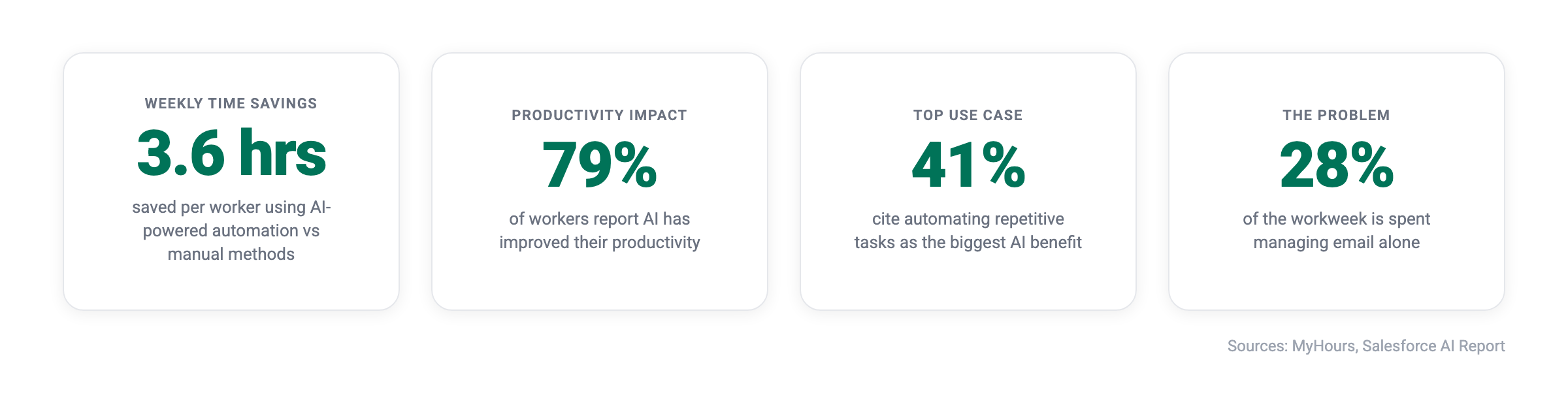
The average professional loses 28% of the workday to reading and responding to email alone. Add Slack messages, Microsoft Teams notifications, and meeting summaries, and knowledge workers can end up spending more time triaging incoming work than completing it. this+that is designed for this inbox-first reality: it reads messages across channels, identifies what needs to happen next, and helps execute those workflows automatically. Task extraction is part of that process, but the larger value is reducing the manual effort required to turn incoming messages into completed work.
Key Takeaways
- The market is exploding - AI email assistant solutions will grow from $1.12 billion in 2026 to $8.9 billion by 2035
- AI shared inbox assistants represent the fastest-growing segment - This category is expanding at 31.8% CAGR
- Time savings are substantial and measurable - Workers using AI-powered automation save 3.6 hours weekly
- this+that helps teams move from incoming messages to execution more reliably by using inbox-first AI workflows rather than relying on manual triage and task entry.
Every message that arrives in your inbox carries a hidden cost. The time spent reading, categorizing, deciding what action to take, and then switching to another tool to execute that action adds up. This “manual tax” compounds across email, Slack, Microsoft Teams, and other platforms until knowledge workers find themselves spending the majority of their time on reactive work rather than meaningful output.
Email and Inbox Automation Market Growth
The Explosive Expansion of AI Email Assistants
The AI email assistant market represents one of the fastest-growing categories in enterprise software, driven by the urgent need to manage communication overload and extract actionable insights from messages.
1. AI email assistant market will reach $8.9 billion by 2035
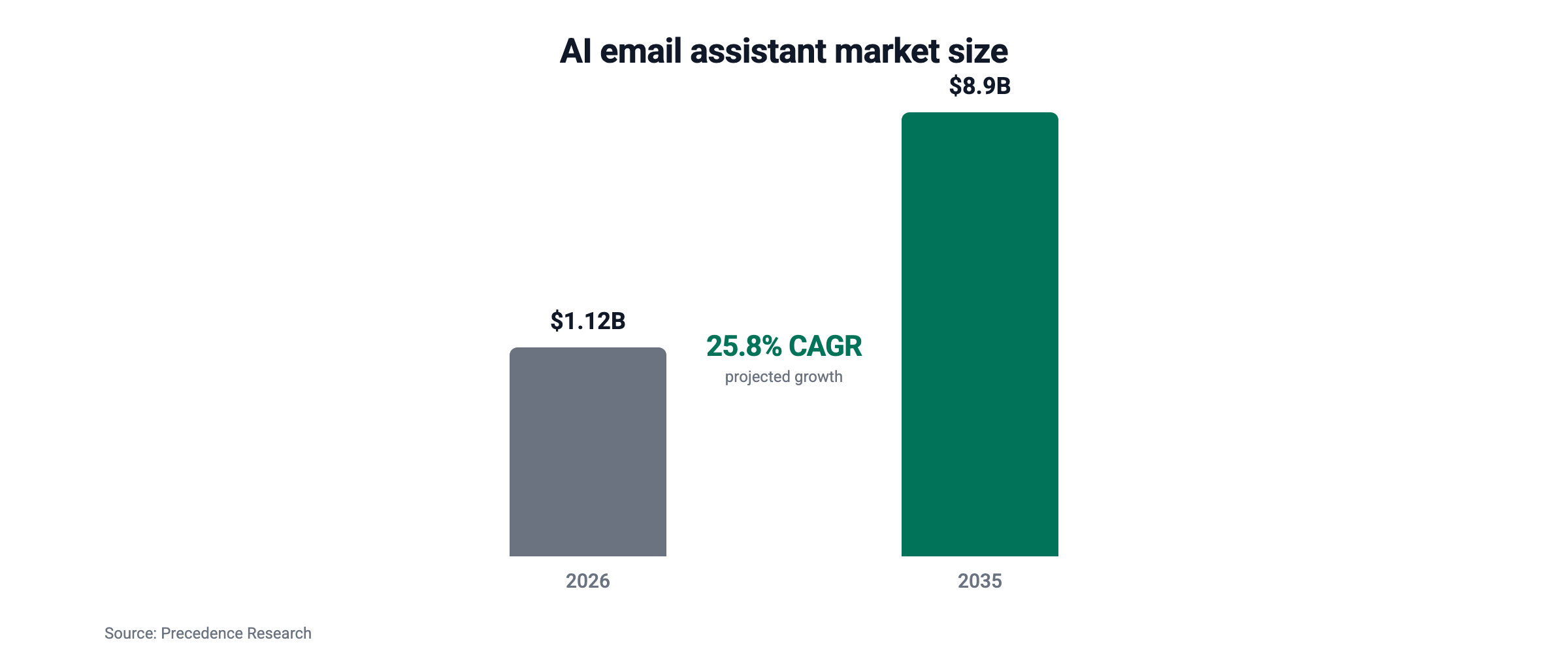
The global AI email assistant market is projected to grow from $1.12 billion in 2026 to $8.89 billion by 2035. This expansion reflects the fundamental shift toward AI-powered productivity tools across all industries. Nearly eightfold growth in less than a decade signals that AI email assistants are moving from experimental tools to core infrastructure for modern work. Organizations that delay adoption now risk falling behind competitors who are already restructuring their workflows around automated message handling.
2. Market growth rate of 25.80% CAGR through 2035
The AI email assistant market is expanding at a 25.80% CAGR from 2026 to 2035, representing one of the fastest-growing categories in enterprise software. This pace outstrips most traditional SaaS verticals and reflects the widespread urgency to solve inbox overload. Sustained double-digit growth over a decade-long horizon indicates that this is a durable shift in how teams operate, not a short-term trend.
3. AI shared inbox assistants growing at 31.8% CAGR
The fastest-growing segment in the AI assistant market is AI shared inbox assistants, expanding at 31.8% CAGR. This category serves support agents, operations coordinators, and sales teams who manage collaborative inboxes. The acceleration reflects how shared inboxes amplify every inefficiency of individual email use, making automation exponentially more valuable when multiple people rely on the same message queue. Teams handling collaborative communication streams see the largest time savings because automation removes duplicate work and unclear ownership at the same time.
4. Large enterprises represent 63.4% of the AI assistant market share
Precedence Research reports that large enterprises contributed 63.4% of AI email assistant market share in 2025. Enterprise adoption signals maturity and proven value, as large organizations conduct extensive evaluation before deploying new technologies. This level of enterprise commitment also validates the security, compliance, and scalability of modern inbox automation platforms. Smaller teams can follow this adoption path with significantly lower risk, knowing the technology has already cleared enterprise-grade vetting.
5. Cloud-based deployment accounts for 68.6% of market share
The AI email assistant market strongly favors cloud deployment, with 68.6% of market share coming from cloud-based solutions in 2025. Cloud architecture enables the rapid integration and API connectivity that modern automation requires. It also allows teams to deploy new capabilities without lengthy IT projects or infrastructure investments. This deployment preference directly supports the extensibility needed for automation that spans email, Slack, Microsoft Teams, and internal tools.
6. North America leads adoption with 39.6% market share
North America dominates the AI email assistant market with 39.6% market share in 2025, reflecting the region’s appetite for productivity technology and AI innovation. Early adoption patterns in North America have historically predicted global trends in SaaS and productivity software. Organizations outside this region that move early on inbox automation can capture competitive advantage before the technology becomes table stakes in their markets.
7. Customer support teams represent the fastest-growing end user segment at 27.9% CAGR
Customer support teams are adopting AI inbox assistants at a 27.9% CAGR, the fastest rate among end user segments. Instant responses, virtual assistants, and predictive support drive this adoption. Support teams face the highest volume of repetitive, time-sensitive messages, making them the first to feel the ROI of automation. The pattern is spreading to sales, operations, and internal teams that deal with similar volumes of structured requests.
Automatic Task Capture: Eliminating Manual Input
The Impact of AI on Task Identification
Traditional productivity workflows often require workers to manually interpret each incoming message, decide what it means, determine the next step, and then move that work into another tool. Sometimes that means creating a task. Other times it means routing a request, scheduling follow-up, collecting context, or triggering a downstream process. Repeating that cycle dozens of times each day consumes attention that could otherwise be spent on higher-value work.
Instead of manually capturing tasks from every message, try this+that free and start automating inbox-driven workflows from the moment work arrives.
8. 79% of workers report AI has improved their productivity
According to research from The Economist, 79% of workers say that AI has improved their productivity at work. This improvement comes largely from eliminating repetitive manual processes like task entry and categorization. When nearly four out of five workers report measurable gains, AI shifts from a nice-to-have into a baseline expectation of modern work. The productivity gap between teams using AI and those still relying on manual workflows continues to widen each quarter.
9. 75% believe AI reduces time spent on repetitive tasks
The same research shows that 75% of workers think AI reduces the time spent on repetitive tasks. Task capture and organization rank among the most repetitive activities knowledge workers perform daily. The more a role depends on inbox-driven work, the greater the reduction in manual effort after automation is introduced. This is precisely the category of work that inbox automation targets directly, turning routine triage into background execution.
10. Automating repetitive tasks represents the biggest AI use case at 41%
When asked how AI increases productivity, 41% cited automating repetitive tasks as the primary benefit. Document summarization followed at 30%. These findings align directly with what DoBox for Gmail delivers through automatic task extraction from messages. The data confirms that the highest-value AI applications are not novel or experimental, but rather the systematic removal of daily manual work that has long drained knowledge workers’ time and focus.
Natural Language Workflow Creation: Designing Productivity
Simplifying Automation with Conversational AI
Building automated workflows traditionally required technical expertise or extensive time learning complex platforms. Natural language workflow creation changes this dynamic entirely, allowing anyone to describe what they want in plain English and receive a functioning automation.
11. 60% of businesses have implemented automation solutions
Duke University research confirms that almost 60% of businesses have already implemented automation solutions in their workflows. This adoption rate reflects growing recognition that manual processes cannot scale with modern business demands. Organizations without automation now operate at a structural disadvantage, as competitors absorb higher message volumes without adding headcount. The remaining 40% represents a closing window of opportunity before automation becomes a universal business standard.
12. 74% of employees say automation helps them work faster
Salesforce research via Vena Solutions shows that 74% of employees using automation say it helps them work faster. Speed improvements come from eliminating manual handoffs, reducing context switching, and ensuring tasks flow automatically between systems. The compounding effect matters most here, as even small time savings on individual tasks accumulate into significant capacity gains across teams. Employees also report lower cognitive fatigue when automation handles the routine plumbing of their workflows.
Workflows enables teams to create custom automations using natural language prompts, removing the technical barrier that prevents most organizations from building sophisticated task automation.
Efficiency Gains with Unified Task Management Platforms
The Value of a Single Source of Truth for Tasks
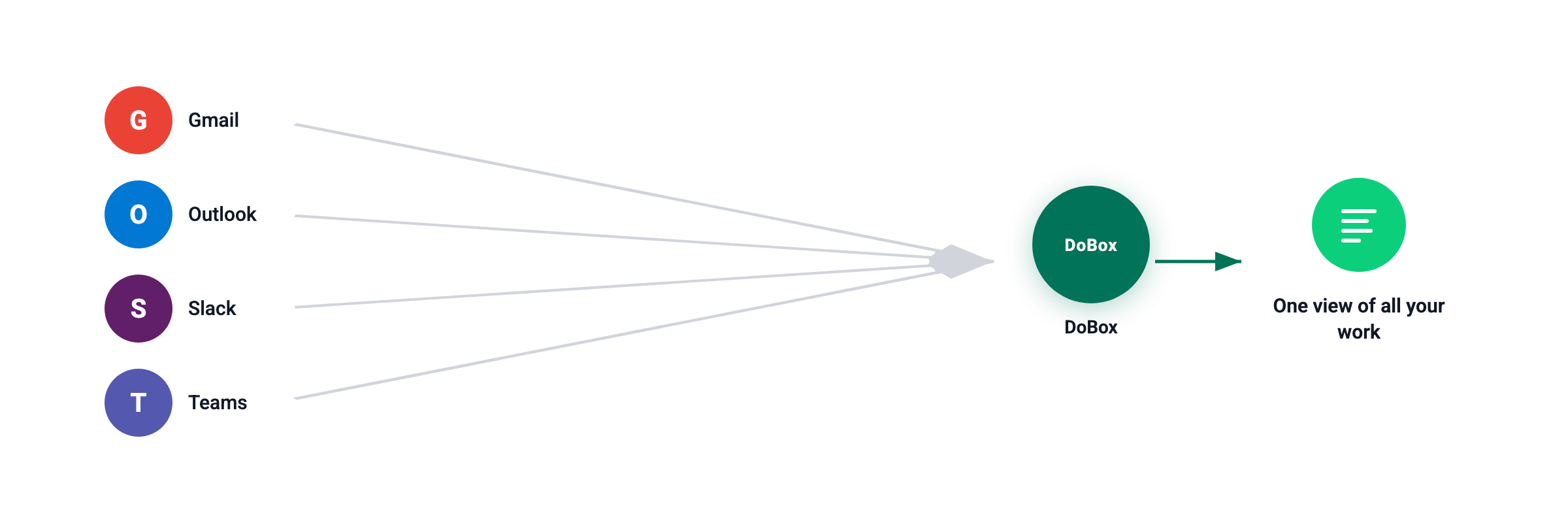
Scattered action items across email threads, Slack channels, and sticky notes create cognitive overhead and increase the risk of missed deadlines. Unified task management consolidates all action items into one view, regardless of their source.
13. Automation saves 3.6 hours per worker weekly
Research shows that automation saves an average of 3.6 hours per worker weekly globally. Annualized, this represents 187 hours of recovered productive time per employee, a substantial return on any automation investment. For a team of ten, that recovered time translates to nearly a full additional employee’s worth of output each year, without adding headcount or overhead. This is why ROI calculations for inbox automation consistently favor rapid deployment over extended evaluation cycles.
Open Integration Architecture: The Power of Extensibility
Breaking Down Integration Barriers
The most powerful automation connects seamlessly with existing tools. Organizations use dozens of SaaS applications, and automation that works only within walled gardens delivers limited value.
this+that’s Model Context Protocol (MCP) architecture enables connection to any API, providing extensibility for custom and internal tools without waiting for official integrations.
Inbox Automation for Specific Roles: Engineering, Sales, and Ops
Tailored Automation for Technical Workflows
Different roles face different inbox challenges. Engineering leads manage sprint action items scattered across GitHub, Jira, and Slack. Sales leads handle inbound routing and follow-up sequences. Operations heads track approval requests across multiple systems.
14. 82% of sales employees report more time for customer relationships
With automation handling routine tasks, 82% of sales employees report increased time for customer relationship building due to automation. Stronger relationships translate to higher close rates and larger deal sizes. Sales teams that automate inbox triage and follow-up reclaim hours each week that can be redirected to high-value conversations with prospects and accounts. The compounding effect on pipeline quality often outpaces the direct time savings themselves.
15. SMEs represent the fastest-growing organization segment at 27.2% CAGR
Small and medium enterprises are adopting AI inbox assistants at a 27.2% CAGR, with market share projected to grow from 36.6% in 2025 to 45.9% by 2035. Accessible pricing and simplified deployment drive SME adoption. Smaller teams often feel the pain of inbox overload more acutely because they lack the headcount to absorb manual triage work. Automation effectively gives SMEs enterprise-grade operational leverage without the associated staffing costs.
Communication Overload and the Hidden Cost of Context Switching
The modern workplace runs on messages because that is where much of the work actually arrives. Email, Slack, Microsoft Teams, and meeting summaries continuously deliver requests, deadlines, approvals, and follow-ups. The problem is not only message volume; it is that incoming work is embedded inside conversations, which forces knowledge workers to manually interpret, organize, and act on it.
this+that is built around this exact problem. Messages are not just communication; they are workflow inputs. By reading messages across tools, identifying what needs to happen next, and supporting automated follow-through, this+that reduces the manual triage and coordination work that usually sits between communication and execution.
16. Time spent managing email dominates the workweek
Research shows that knowledge workers spend around 28% of their workweek on email alone, which accounts for more than a quarter of their time without including Slack, Microsoft Teams, or other communication tools. Once other messaging platforms are factored in, the total share of time spent on communication triage often exceeds the time available for meaningful, focused work. This imbalance is the clearest signal that inbox automation is no longer optional for teams that care about output.
17. Constant task switching fragments attention
Studies show that workers switch tasks every 3 minutes on average, with each incoming message introducing a new potential task and interrupting ongoing work. At this cadence, sustained deep work becomes nearly impossible without deliberate intervention. Automation that absorbs incoming messages and queues tasks for batch review directly addresses this fragmentation by protecting uninterrupted blocks of time.
18. Interruptions create long recovery times
It can take up to 23 minutes to fully refocus after an interruption, meaning even brief inbox checks create a compounding productivity cost across the day. A single glance at Slack or Gmail during focused work can erase nearly half an hour of momentum. Multiply this across ten interruptions per day and the majority of a knowledge worker’s cognitive capacity is consumed by recovery rather than output.
19. Frequent interruptions directly reduce productivity
A majority of employees report the impact clearly, with 68% saying that frequent interruptions hurt their productivity and limit their ability to complete meaningful work. This perception is not simply subjective frustration; it mirrors the measurable cognitive cost of constant task switching. Automation that handles messages in the background allows employees to engage with communication on their own schedule rather than being pulled away by every incoming notification.
20. Inbox checking creates a continuous work loop
Workers tend to check email and messaging tools every few minutes, creating a repeated cycle of reading, deciding, switching tools, executing tasks, and returning to the inbox. Research shows that the average worker experiences 15 interruptions per hour, roughly one every 4 minutes, reinforcing how constant message-checking fragments attention throughout the day. This loop becomes self-reinforcing because unresolved messages create anxiety that pulls workers back to the inbox even when they intend to focus elsewhere. Breaking the cycle requires automation that assures workers their messages are already being processed in the background.
Why Manual Message Handling Is the Real Productivity Killer
The real inefficiency isn’t communication itself, it’s everything that happens after. Every email or Slack message creates hidden work: identifying the task, extracting key details, deciding what to do next, and manually moving it into another tool.
This constant message handling fragments attention and creates a steady stream of interruptions that slow teams down.
this+that removes this layer entirely.
Instead of relying on employees to monitor inboxes and process every request, this+that automatically identifies action items within messages, captures the full context, and turns them into structured tasks that move forward on their own.
Messages are captured across tools. Tasks are extracted instantly. Workflows execute the next step automatically, without inbox triage, manual sorting, or constant context switching.
The result is a fundamental shift: not just from manual to automated task capture, but from reactive message handling to uninterrupted execution.
By automating away email and message processing in one sweep, teams reduce interruptions, stay focused longer, and reclaim hours of productive time every week.
If your team is spending more time managing messages than completing work, it’s time to eliminate the bottleneck. Try this+that free and start turning conversations into completed work automatically, or analyze your inbox to see how much time you can recover.
Frequently Asked Questions
How does automatic task capture differ from traditional task management?
Traditional task management requires you to manually create every task, enter details, set due dates, and assign priorities. Automatic task capture uses AI to identify action items within incoming messages, extract relevant details including deadlines and assignees, and populate your task manager without any manual data entry. Workers using AI-powered automation save 3.6 hours weekly compared to manual methods.
Can inbox automation integrate with custom internal tools?
Yes. Modern inbox automation platforms built on open architecture like Model Context Protocol (MCP) can connect to any API, including custom internal tools. This extensibility eliminates the traditional limitation of waiting for official integrations. Cloud-based deployment accounts for 68.6% of market share specifically because cloud architecture enables this flexible connectivity.
What types of action items can AI automatically extract from messages?
AI-powered inbox automation can identify multiple types of work signals within messages, including direct requests, deadline mentions, follow-up commitments, approval requirements, scheduling needs, and delegation assignments. It can also preserve the source context and support the next step in a workflow, rather than stopping at task identification alone. 41% of workers cite automating repetitive tasks like these as the primary productivity benefit of AI.